




What is Adobe Commerce? Boost your e-commerce presence
In a digitally-driven and ever-changing world, e-commerce has transitioned from being an option to a fundamental part of business success. Do you...

By Role
By Industry
By Target Customer
What We Offer
We drive business growth by improving operational efficiency through process optimization, smart automation, and cost control. Our approach boosts productivity, reduces expenses, and increases profitability with scalable, sustainable solutions
Customer Experience
We design memorable, customer-centered experiences that drive loyalty, enhance support, and optimize every stage of the journey. From maturity frameworks and experience maps to loyalty programs, service design, and feedback analysis, we help brands deeply connect with users and grow sustainably.
Marketing & Sales
We drive marketing and sales strategies that combine technology, creativity, and analytics to accelerate growth. From value proposition design and AI-driven automation to inbound, ABM, and sales enablement strategies, we help businesses attract, convert, and retain customers effectively and profitably.
Pricing & Revenue
We optimize pricing and revenue through data-driven strategies and integrated planning. From profitability modeling and margin analysis to demand management and sales forecasting, we help maximize financial performance and business competitiveness.
Digital Transformation
We accelerate digital transformation by aligning strategy, processes and technology. From operating model definition and intelligent automation to CRM implementation, artificial intelligence and digital channels, we help organizations adapt, scale and lead in changing and competitive environments.
Operational Efficiency
We enhance operational efficiency through process optimization, intelligent automation, and cost control. From cost reduction strategies and process redesign to RPA and value analysis, we help businesses boost productivity, agility, and sustainable profitability.
Customer Experience
Marketing & Sales
Pricing & Revenue
Digital Transformation
Operational Efficiency
Adobe Commerce is an e-Commerce platform with a large and complete number of functionalities, among them is catalog and inventory management, where a product database is established and controlled, each with its respective attributes, such as: weight , price, quantity in inventory and many more. A great advantage of Adobe Commerce over other e-Commerce is the level of product configuration, since these can have a practically unlimited number of custom attributes, in addition the products can be configured as physical, digital, simple, grouped and much more.
Uploading products to an e-commerce is a relatively easy task if done the right way. Remember to consider the possible variables, such as categories, product attributes, images, among others.
Learn how to upload products in Adobe Commerce thanks to these practical ways to do it:
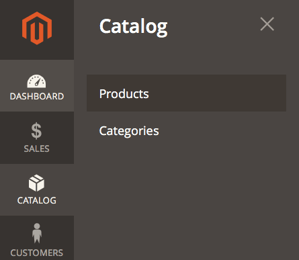
If your e-commerce has few products, such as 30 or less, possibly the easiest way to upload them to the store is with manual upload. For this, you must enter the administration panel, or back office. Then you must enter the Catalog menu and the products section.


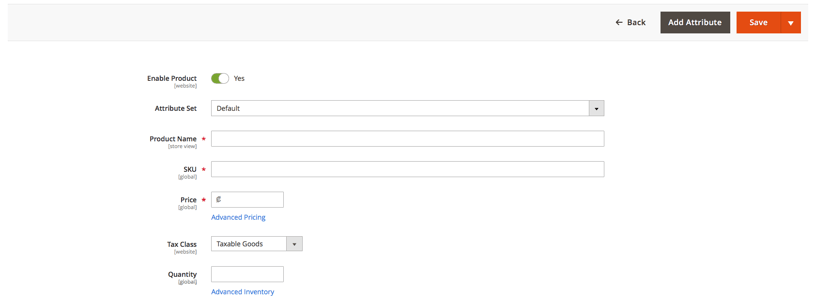
After pressing the Add Product button, enter all the product data, and press Save.
This is the easiest way to upload a product, however, it becomes impractical if the quantity of products is considerably large (for example, greater than 30). When this happens, it is recommended to use Magento's automatic data import tool, which allows you to load products, and all their attributes and images simultaneously.
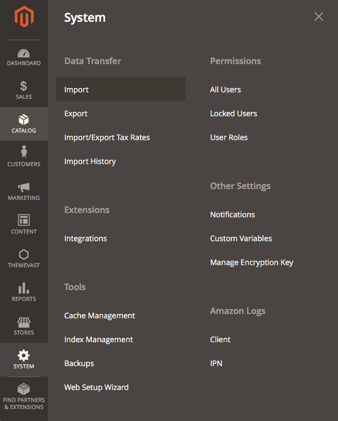
To access the import tool, you must enter the administration panel, then the side menu and the "System" option. From there you enter the “import” option and select “Products”.

The most critical part of loading products is the .csv (comma separated values) file, which contains all the information for each product in table format. Below is a short guide on how to build this file correctly.
Each product can have an unlimited number of attributes—such as color, shape, size, and weight—that help describe it in detail and support a richer shopping experience. You can add as many custom attributes as your business model requires, for example materials, brand, technical specifications, or fields for internal control and reporting.
However, there is a subset of attributes that Adobe Commerce uses not only to describe the product, but also to store it correctly in the database, sort it in the catalog, and classify it across different websites and views. These are essential for the platform to recognize, publish, and manage each item properly. The mandatory attributes you must always include are:
SKU: Refers to the unique code that identifies your product.
Attribute Set: its default value is “Default” and refers to the name of the set of attributes that the product has.
Product Type: the type of product, it can be a simple product (which consists of nothing more than itself), a complex product (which can have several versions or sub-products), or a grouped product (which is a set of products which are often bundled together for a promotion or customer convenience).
Product Websites: its default value is "base” and refers to the web pages to which the product belongs. This is useful when the store exists on multiple pages, such as an international and a local one.
Weight: the weight of the product, it is important to fill in this field if you are going to use a shipping service, as they usually require this attribute.
Product Online: defines if the product will be accessible from the store (1 is yes, 0 is no).
Tax Class: the class of taxes that apply to the product, its default value is "Taxable Goods".
Name: product name.
Price: sale price of the product.
Quantity: quantity in inventory of the product.
In Adobe Commerce, after adding a product, it is sometimes necessary to clear the cache and reindex the database, which can be done from the back-office menu, entering the system, and managing the cache and indexes.
Perhaps all the factors that must be taken into consideration when uploading products can be overwhelming at first, however Imagineer will make it easier for you to upload products to your Adobe Commerce, as can be confirmed by the many testimonials that have managed to upload your products thanks to ICX training and the ease of use of Adobe Commerce.
In a digitally-driven and ever-changing world, e-commerce has transitioned from being an option to a fundamental part of business success. Do you...
Magento is a robust eCommerce solution that has consolidated itself as one of the industry leaders and is quickly growing in popularity amongst...
E-commerce platforms offer the functionality to store lists of products that interest users. Also, this helps improve the customer experience by...